Student Dismissal Software Built for Staff-Led, Real-Time Dismissal
RapidDismiss is student dismissal software that connects the people calling students with the staff responsible for releasing them — in real time, across your whole school. It gives schools a simpler way to coordinate the dismissal process as it happens — without relying on spreadsheets, radios, paper lists, or disconnected processes.
RapidDismiss is staff-led dismissal software. Schools keep their existing procedures for deciding and communicating how students go home, while RapidDismiss helps staff manage the actual dismissal process in real time. No parent app, parent account, QR code, or parent check-in is required.
Students do not have to wait in classrooms. They can be wherever your school’s dismissal process places them, and staff can view dismissal notifications for the entire school or filter them by one or multiple classrooms, one or multiple grade levels, or dismissal location.
$800/year site license · 30-day free trial, no credit card required
Student Dismissal Shouldn’t Be the Most Chaotic Part of the School Day
Dismissal requires schools to coordinate students, classrooms, dismissal locations, staff, transportation methods, and last-minute changes — often with very little notice. Traditional systems often rely on combinations of:
RapidDismiss creates one real-time system connecting the people calling students with the staff responsible for releasing them — so dismissal information moves through a single, organized channel instead of being pieced together across tools.
How RapidDismiss Student Dismissal Software Works
A straightforward 3-step process that keeps dismissal moving.
Call the Student
Dismissal staff enter or select a student’s assigned tag number at their assigned dismissal location.
Staff See the Call in Real Time
The staff responsible for releasing students receive the dismissal call instantly — no radio call or paper list needed. They can view the whole school or filter notifications by classrooms, grade levels, or dismissal location.
Keep Dismissal Moving
Staff continue calling students as dismissal happens across each location while RapidDismiss keeps dismissal information organized across the school in real time.
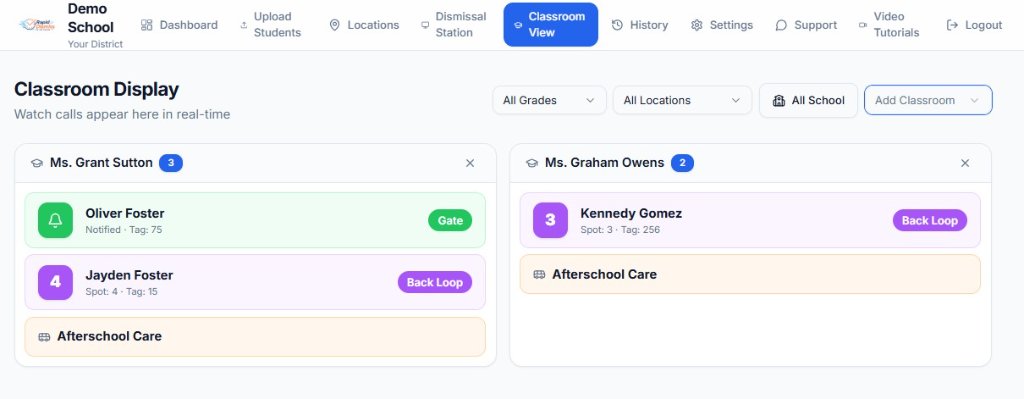
Schools can monitor the whole school at once or narrow the display by classrooms, grade levels, or dismissal location. And because students can be released from wherever the school has them waiting — not only classrooms — the display works with the dismissal setup your school already uses.
For locations that use cones or numbered spots, such as a car-rider line, RapidDismiss can automatically assign the next available spot when a student is called — so staff see the exact spot, not just the general dismissal location. Spots are optional and only apply to locations configured to use them.
Students sharing the same dismissal tag can be called together, allowing siblings to be coordinated at the same time.
One School Dismissal System. Your Locations.
Schools do not all dismiss students the same way. With RapidDismiss, your school decides where students wait, where they are going, and which dismissal notifications staff need to see.
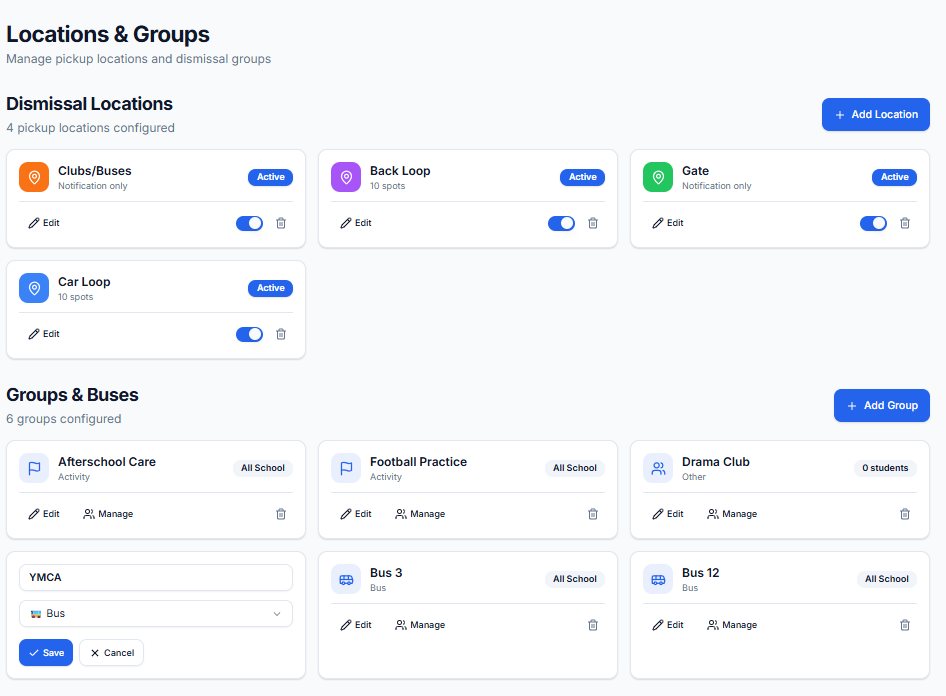
That means RapidDismiss can support classroom-based dismissal, centralized holding areas like a cafeteria or gym, grade-level areas, or a combination of approaches — whatever matches the way your campus actually runs dismissal. Multiple locations can dismiss students simultaneously, while staff can view all locations or filter their display to a specific dismissal location.
Car Riders
Coordinate student calls between the pickup line and the staff releasing students.
Buses
Create dismissal locations that match the school’s bus-loading process.
Walkers
Manage students leaving through designated walker areas or gates.
After-School Programs
Create locations for clubs, programs, daycare pickup, or other dismissal needs.
These are just a few examples. Your school can set up as many dismissal locations as you need and configure individual bus, club, and activity group notifications to match the way dismissal actually works on your campus.
Student Dismissal Software Without the Unnecessary Complexity
Flexible tools that adapt to the way your school manages dismissal.
Real-Time Dismissal Calls
Staff can see student calls as dismissal happens.
Student Tag Numbers
Schools can organize pickup using assigned student/family tag numbers.
Sibling Coordination
Students sharing a family dismissal tag can be called together.
Custom Dismissal Locations
Schools can create locations that match their own dismissal process.
Student CSV Import
Schools can upload student information rather than manually entering every student.
Flexible Dismissal Views
View the entire school or customize the display by classrooms, grade levels, or dismissal location.
Dismiss Students From Anywhere
Students can wait in classrooms, grade-level areas, gyms, cafeterias, auditoriums, or wherever your school’s dismissal process places them.
Multi-School Data Separation
Each school’s student and dismissal information is separated from other schools within the RapidDismiss system.
Your Students Don’t Have to Dismiss From a Classroom
RapidDismiss does not require schools to reorganize students around the software. Because calls happen in real time, staff supervising a classroom, grade-level holding area, gym, or dismissal location can focus on the students relevant to them while administrators can monitor the whole school.
View All School
See dismissal calls across the entire school.
Filter by Grades or Classrooms
Show staff the students relevant to the group they’re supervising.
Filter by Dismissal Location
Focus the display on specific dismissal locations or processes.
Move Beyond Spreadsheets and Paper Dismissal Lists
Traditional dismissal may involve
- printed student lists
- spreadsheets
- radio communication
- staff manually relaying student names
- multiple disconnected processes
RapidDismiss provides
- one digital dismissal system
- real-time dismissal notifications across the school
- organized student information
- configurable dismissal locations
- coordinated sibling calls
- a system designed specifically around school dismissal
Student Dismissal Software FAQs
Answers to common questions about student dismissal software and RapidDismiss.
Ready for a Simpler Student Dismissal System?
See how RapidDismiss can connect your staff and dismissal locations and help organize the way your school manages dismissal.
Back to the RapidDismiss homepage.